Set and Release Retainage on an Owner Invoice
Background
In Procore, the term Retainage refers to the practice of withholding of a portion of a contract amount until the work is deemed satisfactorily complete. The withheld amount is specified in an agreement between the contracting party (the party paying for the work) and a contracted party (the person or company performing the work). A common practice is to withhold 5-10% of a contract's total value until a milestone is reached. Then, the withheld amount can be released as a progress payment. When work is substantially complete, the withheld amount can be released as a final payment.
Things to Consider
Required User Permissions:
'Admin' level permissions on the project's Prime Contracts tool.
Additional Information:
You can only edit the most recently created invoice.
Prerequisites
Edit the Schedule of Values
Navigate to the project's Invoicing tool.
Click the Owner tab.
In the table, locate the invoice to edit.
Click the Invoice # link to open it.
Scroll to the Schedule of Values.
Click Edit.
Set or Release Retainage on individual Line Items
To set or release retainage on invoice line items:
With the Schedule of Values open in edit view, locate the line item(s) to modify and scroll to the right of the page to view the retainage column.
In the Retainage column header, click the Expand Column Group carat to display editable retainage fields:

Scroll to the right and locate the appropriate field(s) to enter new values into.
To set retainage, choose one of the following options:
To set by dollar amount, enter a dollar amount to withhold for the line item in Work Retainage this Period ($). Procore automatically calculates the entry in the Work Retainage (%) field for that line.
Example
If you enter $250 in Work Retainage this Period ($), Procore calculates the Work Retainage this Period (%) as 5%:
To set by percentage, enter a percentage amount to withhold for the line item in Work Retainage this Period (%). Procore automatically calculates the entry in the Work Retainage this Period ($) field for that line.
Example
If you enter 6% in Work Retainage this Period (%), Procore calculates the Work Retainage this Period ($) as $300.00:
To release retainage, enter a dollar value in the Work Retainage Released This Period field. Procore automatically updates the Retainage and Invoice totals.
Note: Retainage can only be released by dollar amount per individual line. To release a percentage, follow the steps under [ ].
Example
If you enter a value in the Work Retainage Released This Period field, Procore reduces the Retainage total which increases the overall Invoice value:
Update the amount of retainage to release in each line item on the invoice as needed.
Click Save.
Set or Release Retainage on Multiple Line Items
With the Schedule of Values open in edit view, locate the line item(s) to modify and scroll to the right of the page to view the retainage column.
Place a checkmark in any or all boxes to select lines:
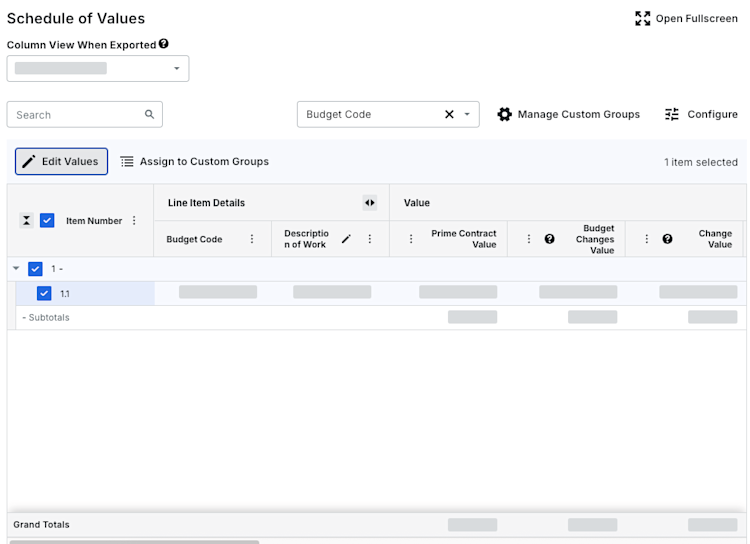
Click Edit Values to open the side panel.
In the panel, enter numerical values in the following fields to replace any existing values for the selected lines:

Total to Date (%) - Enter the total percentage of work and stored materials that have been completed as of today.
Work Retainage this Period (%) - Enter the percentage of retainage to be held on work completed for this period.
Materials Retainage (%) - Enter the percentage of retainage to be held on materials.
Work Retainage Released (%) - Enter the percentage of the retainage to release. For example, enter 100% to release all, or 50% to release half.
This Period (%) - Enter the percentage of work that was completed this period in the Work Completed this Period (%) field.
Click Apply.
Click Save to finalize the changes.
See Also
Loading related articles...