Mark a Coordination Issue as Complete
As the assignee for a coordination issue, your responsibility is to perform the required work to resolve it. Once you have addressed the problem, you must update its status in Procore to communicate your progress. Marking the issue as 'Complete' is how you formally declare your task finished. This updates the issue for all stakeholders. The next step is for a user with 'Admin' level permissions to review your resolution and officially close the issue.
Things to Consider
Additional Information:
You can mark issues in the 'Open' or 'Released' status as complete.
The Mark as Complete button is only available to users with 'Standard' level permissions. If you have 'Admin' level permissions, see Close a Coordination Issue.
Steps
Navigate to the project's Coordination Issues tool.
Click the Issue link to view its details in the side panel.
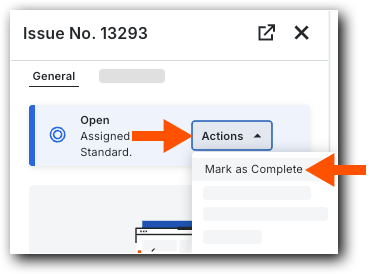
In the side panel, click Actions and select Mark as Complete from the shortcut menu.
The issue is now Ready to Review. As a 'Standard' user, you can reopen the issue before the review starts or if an 'Admin' level plans review it next, see Reopen a Coordination Issue.

Next Step
See Also
Loading related articles...