Scheduled maintenance on internal systems used for Customer Support interactions will take place on Friday, 13 November 2026 at 4:00 PM PST through Sunday, 15 November 2026 at 2:00 PM PST (Saturday, 14 November 2026 at 00:00 UTC through Sunday, 15 November 2026 at 22:00 UTC).
Customer Support will be unavailable during this window, with normal operations resuming immediately following the completion of the work. Responses to requests submitted during the downtime will experience delays, and this status page will be updated once the maintenance concludes. Users may still submit a case via our web form, and any cases received during downtime will be addressed in the order they were received once maintenance is complete.
Welcome to our new support center!
Here, you will find answers to all your questions about Procore products and features—more easily than ever before. This is now the only support site for Procore. The previous site (support.procore.com) is now obsolete and will no longer be updated.
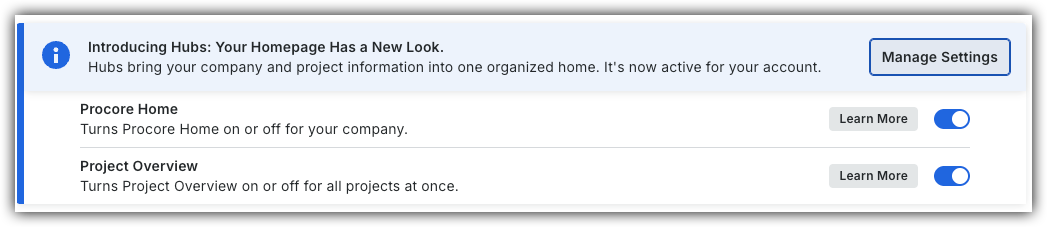
Company Administrators can switch between the new Project Overview and legacy Project Home by following the below steps:
Open the Project Overview or Project Home tool.
Locate the Introducing Hubs banner.
Select Manage Settings on the banner.
Toggle Project OverviewON or OFF to switch between the new view and the legacy view.
However, in early 2027, Project Home will be sunset and will no longer be available.
Background
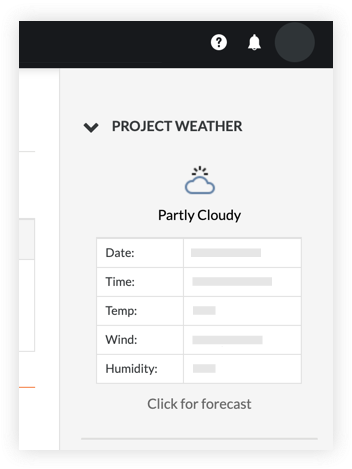
The Project Weather section of the Project Home page allows members of the project to view the current weather forecast for the project site. It also provides you with access to a 7-day weather forecast. For this to appear on your project's Home page, it must be configured by your company's Procore Administrator. Typically, this is configured when the project is created. See Create a New Project.
Things to Consider
Required User Permissions:
'Read Only' or higher permissions on the project's Home tool.
In order for the weather to populate, the project's latitude and longitude coordinates must be entered in the project's Admin tool. See Update General Project Information.
Steps
Navigate to the Project Overview.
Navigate to the project's Home to be redirected to the Project Overview.
Click Menu and select Project Overview.
Click the weather forecast on the 'Project Information' card to view the 7 day forecast.
Steps
Project Home (Legacy)
Navigate to the project's Home tool.
Click the arrow icon next to Project Weather if the weather section is not already expanded.
Click the Click for forecast link to view a 7-day forecast for your project's location.
 to switch between the new view and the legacy view.