Manage Draft Assignment Alerts for Resource Planning
Background
Resource assignments allow you to manage your resources by assigning them to projects. You can create assignment alerts to notify the assignees and share key information about their assignment. You can draft assignment alerts to be sent a later time. See Send Assignment Alerts for Resource Planning.
This tutorial shows you how to manage draft assignment alerts that have not yet been sent to recipients.
Things to Consider
Messages are limited to 1,200 characters, not including dynamic tokens.
Steps
View Draft Assignment Alerts
Send Draft Assignment Alerts Now
Edit Draft Assignment Alerts
View Draft Assignment Alerts
Navigate to the Company level Resource Planning tool.
Click Communications (Beta).
Select Alerts from the drop-down menu.
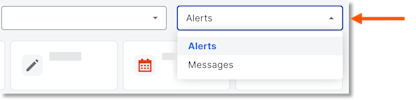
Select Drafts.
In the 'Date/Time Sent' column, select the envelope
 icon for the alert you want to view.
Send Draft Assignment Alerts Now
Navigate to the Company level Resource Planning tool.
Click Communications (Beta).
Select Alerts from the drop-down menu.
Select Drafts.
In the 'Date/Time Sent' column, select the envelope
icon for the alert.Click Send.
Edit Draft Assignment Alerts
Navigate to the Company level Resource Planning tool.
Click Communications (Beta).
Select Alerts from the drop-down menu.
Select Drafts.
In the 'Date/Time Sent' column, select the envelope
icon for the alert.Edit the assignment alert.
Recipients. Select who will receive the assignment alert.
Select a recipient from the drop-down menu to add them to the alert.
Click remove next to a recipient to remove them.
Schedule Delivery. Select whether the message is scheduled for delivery.
Move the 'Schedule Delivery' toggle
 ON to schedule the assignment alert. Then enter the date and time for the scheduled assignment alert to be sent.
Leave the 'Schedule Delivery' toggle
 OFF to keep the assignment alert as a draft.
Subject. Enter the subject of the assignment alert.
Alert Content. Enter the information to be sent in the assignment alert.
Click Save Draft.
See Also
Loading related articles...